
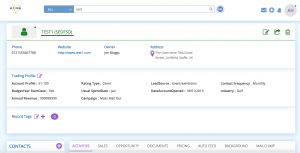
The Record Card within BuddyCRM is a full picture of a Company Record. Here you will be able to view details of the Company itself, Contacts, Activities, Background information on the company, Sales data. You will also be able to see if the Company is a Lead or Account.
To access a Record, simply search for the Company Name in the Buddy Search Bar. You can also click on the Company name from the Activities area on the Home Page.

Alternatively, you can access the Record card from the Lead or Account modules. Simply click on the name of the Company and this will open another tab with the Record card details.

When you have selected the Company name, the Record card will then appear. A Lead is determined by the colour Blue.

An Account is determined by the colour Green.
If you require any further assistance, please do not hesitate the BuddyCRM Support team. Details on how to do so are in our ‘Still Need Assistance’ area.