A common question is how to set yourself a reminder to follow up on a lead.
First, hit the ‘create’ plus button in the top-right of BuddyCRM:

Select ‘Create Call’
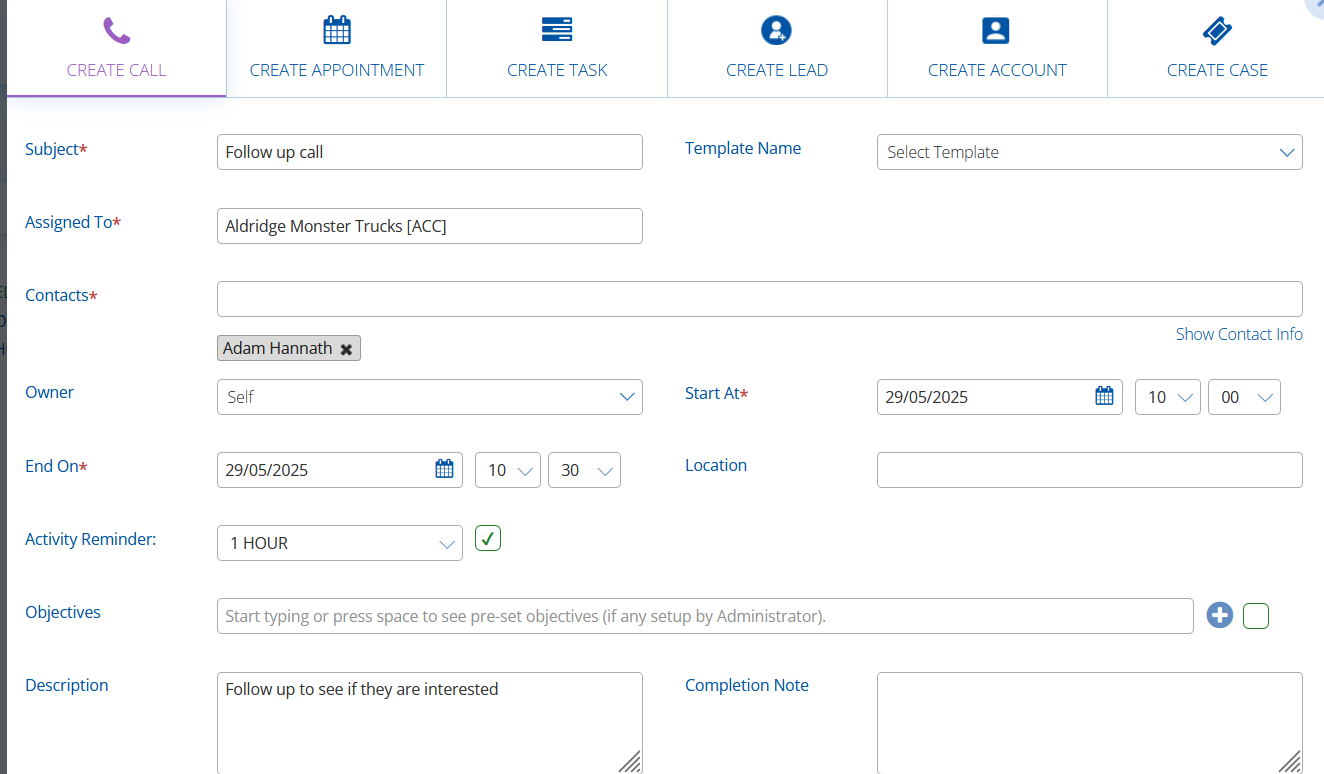
Enter a subject that will be meaningful to your activity, such as ‘Follow up call’.
In ‘Assign To’, select the lead that the call should be for. Hint: if you are already in the record card for the lead, then this will pre-fill automatically!
Select the contact from the company that you need to call in ‘Contact’. Hint: hit the space bar to bring up a list of all of the contacts associated with the record.
BuddyCRM will default to ‘self’ for the ‘owner’, however if you need to make the follow up call for one of your colleagues you can select their name from the ‘owner’ dropdown.
Choose the date and time for the call in ‘StartAt’, adjusting the end date or time as necessary.
Tick the checkbox next to ‘Activity Reminder’ and select the timeframe as to when the reminder should send to you. Enabling this option will send you a handy email reminder at your chosen time!
Write a short description detailing what needs to be done and finally click ‘save’!