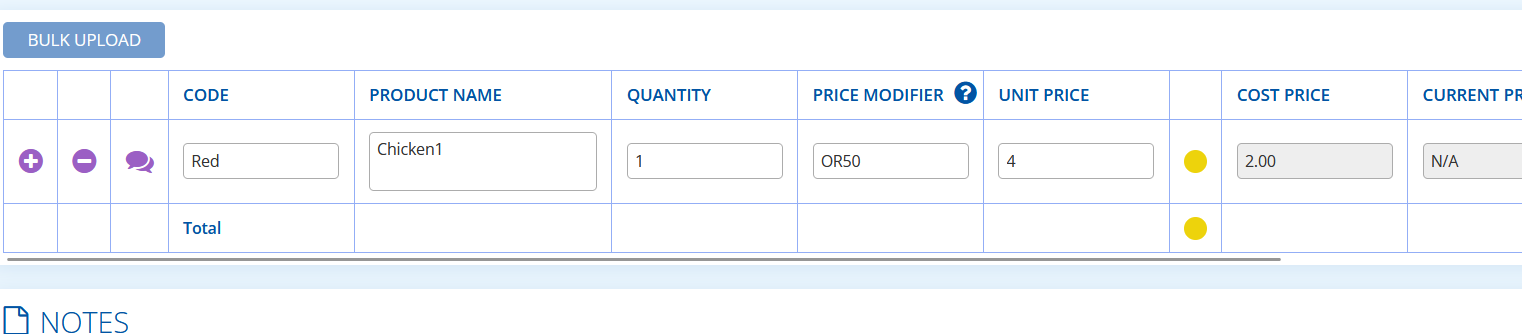
On the Quote module the user can apply three different price modifier codes to a product line to alter the price. In this article, we will detail the individual use cases of each with examples.
For my example, I am using a testing subscription and a product that has a £10 list price, £2.00 cost price:

Off List Price – OL
Entering the code OL plus a number takes a percentage off the list price.
Example:

You can see that 50% off list price reduces the unit price to 5.00.
On Cost – OC
Entering OC plus a number takes the cost price and adds a percentage on top.
Example:

You can see that 50 On Cost takes the cost price (2.00) and adds 50% (1.00) resulting in a unit price of 3.00.
On Return – OR
When you apply an OR modifier to a quote line – for example OR20 or OR50 – the system calculates the unit price by working backwards from your cost price to hit a target gross margin. The number you enter is the percentage of the final selling price that will be profit. So OR20 on a £2.00 cost gives a unit price of £2.50, because £0.50 is exactly 20% of £2.50. This is different from a simple markup — a 20% markup would just add £0.40 on top to give £2.40. The formula the system uses is: Unit Price = Cost ÷ (1 − OR% ÷ 100). The higher the OR percentage, the more pronounced the difference becomes – OR50 doubles the cost price, because if half the selling price must be profit, the price must be twice the cost.